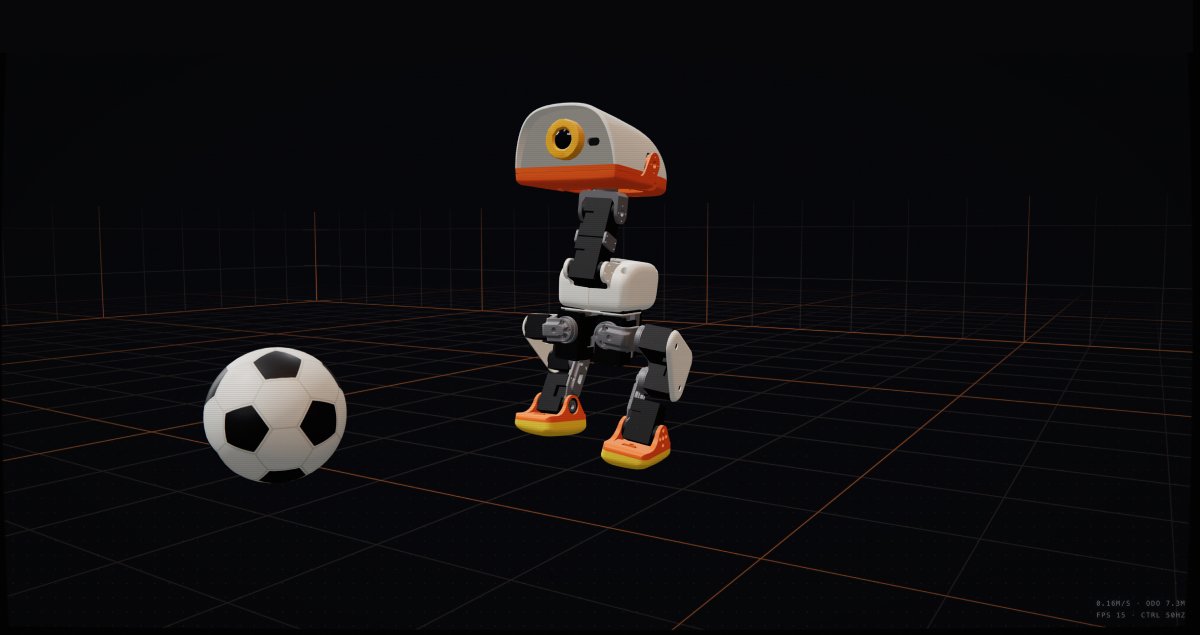
Pollen Robotics and Hugging Face must be elated by their massively successful Microduck campaign that surpassed $2.6 million in sales within the first 24 hours and 13k+ sold in the first week!
Microduck is the first robot labeled “cute” by my wife, who normally finds robots creepy. That was a key inspiration for me to shell out the dough to bring one home and have it waddle around our house.
While this robot is adorable, it’s an absolute powerhouse for building skills in physical AI.
Microduck’s release couldn’t be more perfectly timed for my personal tech journey. I’d been focused on NVIDIA Omniverse since February, which introduced me to Isaac Lab for training robots with Reinforcement Learning. While that journey was fun, limited hardware options made learning sim-to-real feel out of reach mainly because I didn’t want to waste money on a basic robot arm that I personally find boring.
Microduck uses MuJoCo for training, which is new to me and will broaden my understanding of building virtual environments optimized to train robots across different platforms, not to mention give me hands on experience with sim-to-real.
I’ll finally be able to combine my passion for virtual worlds and robotics to bring simulations into the physical world, which has been a core goal of my exploration on Tech-Multiverse!
I wanted to pre-order Microduck on day one, since he seemed like so much fun, but I needed to be sure my hardware was able to handle training. That delayed me placing my order until 3 days after the release, which pushed out my expected order arrival date to 4-6 months. A bit bummed that he won’t arrive until early 2027, I’m at least able to run simulations and learn as much as I can before the hardware gets here. In fact, I’ve already started!
What Makes Microduck so Special?
Microduck is brilliantly designed to be adorable, affordable, and educational. This little fella offers a lot of character thanks to the 2 IMUs, one in the body and one in the head, which help him balance and track movement. That allows him to handle being pushed around, with proper training of course!
Microduck walks with a waddle, sits, crouches, roller-skates, picks objects up with its beak and gets back on its feet from many common fall positions.
Specifications
- Motors: 15 degrees of freedom, across articulated legs, head and neck
- Dimensions: 25 cm tall, 14 cm wide
- Weight: under 800 g
- Compute: Rockchip RK3566 with AI accelerator
- Memory: 1 GB RAM, 32 GB storage
- Vision: front camera, with a dedicated camera-use indicator inspired by classic REC lights
- Motion sensing: 2 IMUs, one in the body and one in the head
- Range sensing: compact LiDAR, an 8×8 time-of-flight matrix
- Physical interaction: articulated grasping beak
- Audio: microphones and speaker, with a per-robot generated voice
- NFC: 2 antennas, one in the head and one in the beak
- Connectivity: Wi-Fi and Bluetooth
- Battery: removable NP-F550 camera battery, 2600 mAh, around one hour of runtime depending on use
- In the box: game controller, playable before writing any code, plus autonomous behaviors at launch
- Software: open-source SDK with virtual training environments, RL training scripts and tools, and a tested sim-to-real workflow, released before the first robots ship
Open-Source
You can clone the repo that is Microduck’s brain, or do what I did and clone the Microduck RL repo and start training Microduck locally on your own machine without requiring the physical robot. There’s a TON to learn from everything Pollen Robotics has provided, which I personally appreciate!
Local Training Test Run
The only hardware requirements I found was a CUDA enabled GPU, which means my NVIDA RTX 4060 does the job.
I still needed more proof that my Windows machine could handle training before placing my pre-order, so once I cloned the Microduck RL repo and navigated a few hiccups getting MuJoCo set up to use my GPU, I kicked off a training run to get him walking with velocity commands using 4096 training environments and max_iterations set to 1500, so I could see results in approximately 1.5 hours using the following command.
uv run train Mjlab-Velocity-Flat-MicroDuck --env.scene.num-envs 4096 --agent.max_iterations 1500Here is a short video of me replaying the resulting training policy, which is technically ready to migrate over to the hardware, if I was ok with a wobbly duck:
I was happy enough with those results to place my pre-order, even though I tend to struggle to spend money on robot hardware knowing it tends to sit around more often than not. But, this felt like a solid investment in building my skills in physical AI and robotics in general.
How Much Did it Cost Me?
While they promote the $399 introductory price, I wanted to get the additional Dev Kit and Accessory Pack to ensure I had extra motors around. Plus I absolutely must see Microduck roller blade around my house! So, that kicked the price up a bit!
- Microduck = $399
- Includes Robot, battery, USB-C cable, game controller.
- Dev Kit = $119
- Include: 3x spare motors, 5x motor cables, 2x batteries, dual charger, 10x NFC tags, Hugging Face credit, screwdriver, screw pack.
- Accessory Pack = $39
- Includes: Laser pointer, NFC polaroid, 2x rollers, ball, 10x NFC tags.
While that all adds up to $557.00, you have $30 in shipping and a whopping $111.41 for additional duties that get tacked on.
(Duties costs vary based on what you order)
For a grand total of $698.41
Like I said, that wasn’t easy for me to pull the trigger on, but this feels like an investment in my continued growth in robotics, physical AI, and opens up the ability to experience the challenges of the sim-to-real process that I’ve heard so much about.
Plus, I’ll have an amazing new project that I’ll enable me to generate tons useful content on Tech-Multiverse that I hope will inspire anyone interested in robotics to get started.
What’s Next?
While I’m waiting for my Microduck to arrive, I’m planning to build up my skills in using Reinforcement Learning to train my virtual version of Microduck. I’m honestly not sure where that will lead me.
I was bummed that the Microduck RL model uses a MuJoCo specific XML data format called MJCF, rather than OpenUSD like NVIDIA Isaac Sim, but it sounds like MuJoCo does support OpenUSD and MJCF can be converted to OpenUSD, so I’m almost certain I’ll be exploring all that at some point along the way.
This is one of those times where I’ll have to see where this journey takes me, but I’m excited to get my hands on the physical Microduck robot in 2027 and share everything I learn with you on here Tech-Multiverse!